How to Identify SATA 1 2 3 (2026 Complete Guide)
Last updated: July 19, 2026 | Estimated reading time: 14 minutes
How to Identify SATA 1 2 3 Ports in 2026 – Complete Motherboard Guide
SATA (Serial Advanced Technology Attachment) ports are the standard interface for connecting storage devices like hard drives and SSDs to your motherboard. Over the years, SATA has evolved through three main generations: SATA 1, SATA 2, and SATA 3, each offering increased bandwidth. Knowing which SATA generation your ports support is important because it directly affects the performance of your storage devices. A SATA 3 SSD connected to a SATA 1 port will be limited to SATA 1 speeds, leaving most of its performance untapped. This comprehensive guide will show you how to identify which SATA generation your motherboard ports support, ensuring you get the best performance from your storage devices.
| SATA Generation | Maximum Speed | Common In |
|---|---|---|
| SATA 1 (SATA I) | 1.5 Gbps (150 MB/s) | Pre-2007 motherboards |
| SATA 2 (SATA II) | 3.0 Gbps (300 MB/s) | 2007-2012 motherboards |
| SATA 3 (SATA III) | 6.0 Gbps (600 MB/s) | 2012+ motherboards |
Table of Contents
- Understanding SATA Generations
- Speed Differences Between SATA 1, 2, and 3
- Physical Identification of SATA Ports
- Method 1: Check Your Motherboard Manual
- Method 2: Check BIOS/UEFI Settings
- Method 3: Use Software Utilities
- Method 4: Visual Inspection of the Motherboard
- Color Coding and Labeling
- Which SATA Port Should You Use?
- Frequently Asked Questions
Understanding SATA Generations
SATA (Serial Advanced Technology Attachment) is a computer bus interface that connects host bus adapters to storage devices such as hard disk drives, solid-state drives, and optical drives. SATA has gone through three main generations, each offering higher bandwidth than the previous one.
SATA 1, also known as SATA I, was the first generation of SATA, introduced in 2000. It provides a maximum bandwidth of 1.5 Gbps, which translates to approximately 150 MB/s after accounting for encoding overhead. SATA 1 replaced the older Parallel ATA (PATA) interface and provided a significant improvement in speed and cable management.
SATA 2, or SATA II, was introduced in 2004 and doubled the bandwidth to 3.0 Gbps, or approximately 300 MB/s. This increase in speed allowed for faster data transfer between the motherboard and storage devices, though most hard drives of the era could not saturate even SATA 1 bandwidth.
SATA 3, or SATA III, arrived in 2009 and doubled the bandwidth again to 6.0 Gbps, or approximately 600 MB/s. SATA 3 is the current standard and is the minimum recommended for modern SSDs, which can reach speeds of 500-560 MB/s, approaching the maximum bandwidth of the SATA 3 interface.
Understanding these generations is important because connecting a storage device to a port of a lower generation limits its maximum speed to that generation’s bandwidth. A SATA 3 SSD connected to a SATA 2 port will be limited to approximately 300 MB/s, even though the SSD is capable of 500+ MB/s.
Speed Differences Between SATA 1, 2, and 3
The practical speed differences between SATA generations significantly impact storage device performance. Understanding these differences helps you make informed decisions about which ports to use for your storage devices.
SATA 1 provides a maximum throughput of approximately 150 MB/s. This speed was adequate for the hard drives of its era, which typically achieved sequential read speeds of 50-100 MB/s. However, SATA 1 is significantly slower than modern storage devices, and connecting an SSD to a SATA 1 port severely limits its performance.
SATA 2 provides a maximum throughput of approximately 300 MB/s. This speed is sufficient for most hard drives, which rarely exceed 200 MB/s even in RAID configurations. However, SATA 2 limits the performance of modern SSDs, which can reach 500+ MB/s on SATA 3 ports.
SATA 3 provides a maximum throughput of approximately 600 MB/s. This speed is necessary to realize the full performance of modern SATA SSDs, which typically achieve 500-560 MB/s sequential read speeds. SATA 3 also provides enough bandwidth for most consumer storage configurations, including multiple drives in various arrangements.
| SATA Generation | Max Speed | HDD Performance | SSD Performance |
|---|---|---|---|
| SATA 1 | 150 MB/s | Full speed for most HDDs | Severely limited |
| SATA 2 | 300 MB/s | Full speed for all HDDs | Limited to ~300 MB/s |
| SATA 3 | 600 MB/s | Full speed for all HDDs | Full SSD speed (500+ MB/s) |
The performance difference between SATA generations is most noticeable with SSDs. A SATA 3 SSD connected to a SATA 2 port will experience approximately 40-50% reduction in sequential read/write speeds, which is significant for tasks like file transfers, game loading, and application startup.
Physical Identification of SATA Ports
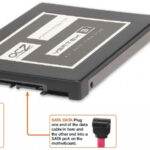
Identifying SATA ports on your motherboard can be done through physical inspection. SATA ports are typically located along the edge of the motherboard and are recognizable by their distinctive L-shaped connector design.
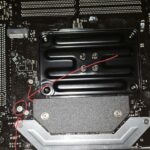
SATA ports are small, rectangular connectors with an L-shaped internal key. They are typically grouped together in blocks of two to eight ports. On most motherboards, the SATA ports are located in the lower-right area of the board, near the chipset heatsink.
The physical appearance of SATA 1, 2, and 3 ports is identical. The connector design, size, and shape are the same across all SATA generations. This means you cannot visually distinguish between SATA generations based on the port’s physical appearance alone. You must use other methods to identify which generation each port supports.
SATA Express and M.2 SATA ports look different from standard SATA ports. SATA Express ports are larger and combine SATA connectivity with PCIe lanes. M.2 slots can support SATA or PCIe NVMe devices and use a different form factor entirely. These ports are not interchangeable with standard SATA ports.