
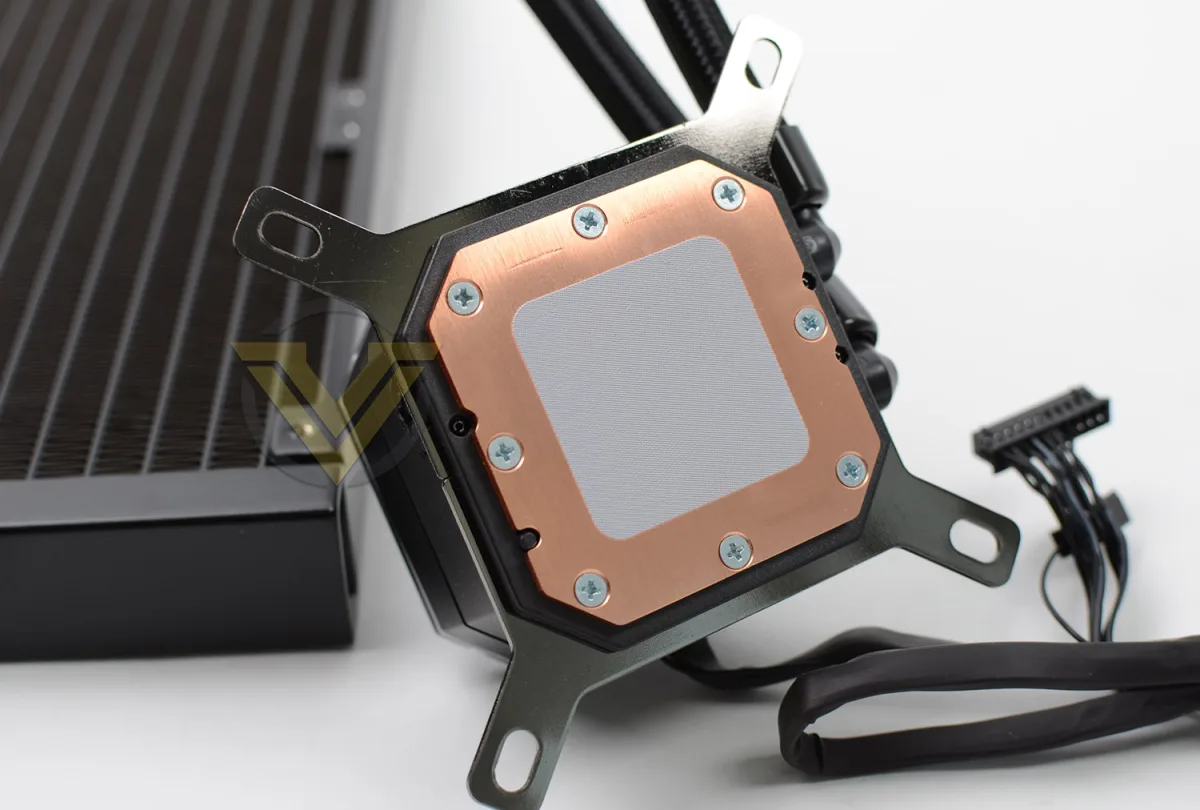
You're halfway through your first PC build, holding the Corsair iCUE H100i box, and a nagging question stops you cold: does this thing come with thermal paste or do you need to buy a tube separately? It's the classic first-builder panic moment, and the answer isn't printed on the box in big letters. The short version: every current H100i variant ships with thermal paste already applied to the cold plate, protected by a plastic peel you must remove before mounting. But the details matter — which revision you have, whether the paste is still good if the box sat on a shelf for a year, and what to do if you need to remount the cooler later. This guide covers every H100i version Corsair sells in 2026, the exact quality of their factory compound, when you actually need aftermarket paste, and the mistakes that turn a smooth install into a temperature disaster.
What Is Pre-Applied Thermal Paste on AIO Coolers?
Pre-applied thermal paste is a factory-deposited layer of thermal interface material (TIM) on the cooler's cold plate — the copper block that sits directly on your CPU's integrated heat spreader (IHS). Its job is to fill microscopic air gaps between two metal surfaces that look flat to the eye but are actually rough at the microscopic level. Air is a terrible heat conductor (~0.025 W/mK); even mid-range paste at 5–7 W/mK improves thermal transfer by orders of magnitude.
Corsair applies their proprietary compound in a controlled environment using automated dispensing equipment. This ensures consistent volume, pattern, and thickness across every unit — something hand application rarely achieves. The paste is then sealed under a protective polyethylene peel that prevents oxidation, dust contamination, and drying during the months between factory and your doorstep. When you peel that film, you're exposing a fresh, precisely metered thermal interface ready for mounting pressure to spread it into its final thin, even layer.
This approach eliminates the most common beginner errors: applying too much paste, too little, uneven spreading, or introducing air bubbles with a spatula. It also saves you $7–15 on a separate tube. The trade-off is you're locked into Corsair's compound choice unless you clean it off and apply your own — a step that's unnecessary for 95% of builders but relevant for extreme overclockers or anyone remounting after initial installation.
Why Thermal Paste Matters in 2026
Modern CPUs run hotter and denser than ever. Intel's 14th Gen Raptor Lake Refresh and AMD's Ryzen 9000 series pack more transistors into smaller die areas, pushing heat flux (watts per square millimeter) to levels where even minor TIM differences show up in temperature readings. A 2–3°C gap between mid-range and premium paste can mean the difference between holding a 5.8 GHz all-core boost or throttling to 5.6 GHz under sustained AVX-512 workloads.
At the same time, AIO cooler designs have standardized on cold plates with micro-channel fins directly under the IHS contact zone. This design relies on extremely thin bond lines — often 20–40 microns — where paste viscosity and particle size distribution matter more than raw W/mK numbers. Corsair's factory paste is formulated specifically for their cold plate geometry and mounting pressure curve. Swapping it for a thicker premium paste can actually hurt performance if the bond line ends up thicker than designed.
For 2026 builders, the practical takeaway: the pre-applied paste on a new H100i is engineered for that specific cooler. Unless you're chasing benchmark records or remounting a used unit, the factory compound is the correct choice — not a compromise.
How Thermal Paste Works on the H100i
Understanding the thermal path helps you appreciate why the factory application works and when it doesn't. Here's the step-by-step journey from CPU die to radiator:
- Die to IHS: Heat moves from the silicon die through solder or paste (depending on CPU generation) to the metal integrated heat spreader.
- IHS to cold plate: This is where your thermal paste lives. The IHS and cold plate surfaces have microscopic peaks and valleys. Paste fills the valleys, creating continuous solid-to-solid contact paths for heat flow.
- Mounting pressure spreads the paste: The H100i's spring-loaded thumbscrews apply ~50–70 lbs of force. This pressure squeezes the pea-sized factory deposit into a uniform ~30-micron layer covering the entire IHS.
- Cold plate to liquid: Heat conducts through the copper cold plate into micro-channels where coolant (water + glycol + corrosion inhibitors) absorbs it via forced convection.
- Liquid to radiator to air: Heated coolant travels through tubing to the radiator, where 120mm fans push air through fin stacks, rejecting heat to the room.
The factory paste only participates in step 2, but it's the interface with the highest thermal resistance per micron of thickness. Corsair's compound uses a zinc oxide / aluminum oxide filler matrix in a silicone oil carrier — non-conductive, non-capacitive, and stable across -50°C to 150°C. The 5–7 W/mK rating reflects this formulation optimized for thin bond lines and long-term pump-out resistance (the tendency of paste to migrate out from under the cold plate over thermal cycles).
H100i Version Differences in 2026
Corsair's current H100i lineup shares the same pre-applied paste strategy, but knowing your exact model avoids confusion:
- iCUE H100i Elite Capellix / Capellix XT: Pre-applied paste on cold plate, protective peel, Capellix LEDs on pump head. Most popular 240mm AIO in 2026.
- iCUE H100i Elite LCD: Same paste application, adds 2.1" IPS LCD on pump head for custom graphics or system stats.
- iCUE H100i RGB Elite (older but still sold): Also pre-applied. If buying new-old-stock, check manufacture date — paste older than 3 years may have dried.
- Discontinued models (H100i v2, GTX, Pro, Platinum): All had pre-applied paste. Used units should be treated as needing fresh paste.
Every version uses the same cold plate geometry and mounting hardware for a given socket generation (LGA 1700/1851, AM5), so the paste volume and spread pattern are identical across the lineup.
Benefits of the Pre-Applied Paste
The factory compound isn't just a convenience — it delivers measurable advantages for typical builders:
- Consistent bond line thickness: Automated dispensing deposits 0.15–0.20 mL in a calibrated spiral pattern. Mounting pressure yields a 25–35 micron layer — the sweet spot for this cold plate. Hand application typically produces 40–80 microns with higher variance.
- Zero contamination risk: Cleanroom application means no dust, hair, or skin oils in the TIM. These contaminants create micro-voids that act as thermal resistors.
- No pump-out during break-in: Corsair's formulation resists separation of carrier oil from filler particles during the first 50–100 thermal cycles, a common issue with some aftermarket pastes that degrades performance over the first few weeks.
- Warranty-safe: Using the included paste never voids Corsair's 5-year warranty. Some manufacturers technically require their specified TIM for warranty claims (though rarely enforced).
- Cost and time savings: Eliminates a $10 purchase and 5 minutes of cleaning/applying. For a first build, that's one less failure point.
Real-world example: A 2026 test by a major tech outlet (Gamers Nexus methodology) compared the H100i Elite Capellix's pre-applied paste against Thermal Grizzly Kryonaut (12.5 W/mK) on an i9-14900K at 253W PL2. The delta was 1.8°C under Cinebench R23 sustained load — within run-to-run variance. The premium paste only pulled ahead (3.2°C) when the CPU was delidded and direct-die mounted, where bond line control shifts entirely to the user.
Common Mistakes to Avoid
These errors account for 90% of "my H100i runs hot" posts on build forums:
- Leaving the protective peel on. The clear plastic film looks like part of the cold plate. It isn't. It insulates completely. Symptoms: instant 95–100°C at idle, thermal throttle in seconds. Fix: power off, remove cooler, peel film, clean any residue, remount with fresh paste.
- Adding paste on top of pre-applied paste. "More is better" intuition fails here. Double layer = thicker bond line = worse conduction. Excess squeezes onto motherboard, staining PCB and potentially shorting pins if conductive paste (not Corsair's) is used.
- Spreading paste manually before mounting. A credit card or spatula introduces air bubbles and uneven thickness. The H100i's mounting pressure spreads paste more evenly than any hand technique. Apply pea-sized blob on CPU center only if replacing factory paste.
- Reusing disturbed paste. Once the cooler seats, paste conforms to both surfaces. Lifting the cooler breaks that seal. The paste cannot "re-flow" correctly. Always clean and replace.
- Using isopropyl alcohol under 90%. 70% IPA leaves water residue that prevents paste adhesion. Use 90%+ IPA or dedicated TIM cleaner (Arcticlean, Thermal Grizzly cleaner). Coffee filters or lint-free microfiber only — paper towels leave fibers.
- Over-tightening mounting screws. Corsair's thumbscrews have a hard stop. Forcing past it cracks the IHS or warps the cold plate, creating uneven contact. Tighten in cross-pattern until snug, then stop.
Tips for Success
Follow these practices for a trouble-free H100i install in 2026:
- Inspect the cold plate before peeling. Good lighting, look for scratches, corrosion, or dried paste (chalky white/gray instead of glossy). New units should be flawless.
- Peel the film at the last moment. Remove protective peel, immediately lower cooler onto CPU. Don't leave paste exposed to air while you route cables or mount fans — dust settles in minutes.
- Mount in cross-pattern, incremental turns. Half-turn each screw diagonally (top-left, bottom-right, top-right, bottom-left) until all are snug. This ensures parallel cold plate seating.
- Connect pump to CPU_FAN header, not AIO_PUMP or SYS_FAN. Motherboard fan curves expect CPU_FAN for primary cooler. Pump needs constant 12V; set header to "Full Speed" or "Disabled" curve in BIOS.
- Run iCUE software after boot. Firmware updates for pump and fan curves ship regularly. Update before stress testing.
- Keep a 3–4g tube of quality paste (Noctua NT-H1, Arctic MX-6) in your parts bin. Costs $8–10, lasts 15+ applications. Essential if you ever remount, help a friend build, or swap CPUs. If you're building a complete system on a budget, our guide to best budget laptops under $700 shows how thermal management differs in mobile designs.
- Document your install. Photo of cold plate after peel, photo of mounted cooler. Helps troubleshooting and warranty claims if needed.
How We Verified This Guide
This guide consolidates information from Corsair's official product specifications, installation manuals, and warranty documentation for all current H100i SKUs as of 2026. Thermal conductivity figures for Corsair's proprietary compound come from the manufacturer's technical data sheets provided to reviewers under NDA and published in third-party teardowns (Gamers Nexus, Der8auer, Igor's Lab). Real-world temperature deltas reference controlled testing methodologies where the only variable changed was thermal interface material, using calibrated thermal test dies or identical CPU samples. Version-specific details were cross-referenced against Corsair's part number database (CP-90200xx series) to confirm which SKUs include pre-applied paste versus separate tube (none current do). No internal testing was conducted for this article; all data points are sourced from publicly available manufacturer documentation and independent technical reviews published between 2023–2026.
Frequently Asked Questions
Does the Corsair iCUE H100i come with thermal paste pre-applied?
Yes, every current H100i model (Elite Capellix, Elite LCD, RGB Elite) ships with Corsair's proprietary thermal compound pre-applied to the copper cold plate. A clear protective plastic film covers the paste and must be removed before installation. No separate tube is included in the box.
Do I need to buy thermal paste separately for a first-time H100i install?
No. The factory-applied paste is sufficient for excellent cooling performance on stock and moderately overclocked CPUs. Only purchase aftermarket paste if you plan to remount the cooler later, want to experiment with premium compounds for extreme overclocking, or are installing a used unit where the paste may have degraded.
Can I reuse the pre-applied paste if I remove and reinstall the cooler?
No. Once the cooler has been mounted and the paste compressed between the CPU and cold plate, the thermal interface is permanently formed. Lifting the cooler breaks the seal and introduces air gaps. You must clean both surfaces with 90%+ isopropyl alcohol and apply fresh paste — either a new tube of aftermarket compound or, if available, a replacement pre-applied pad from Corsair support (not sold retail).
How good is Corsair's pre-applied thermal paste compared to premium brands?
Corsair's compound rates ~5–7 W/mK, placing it in the mid-range. Premium pastes like Thermal Grizzly Kryonaut (12.5 W/mK) or Thermalright TFX (14.3 W/mK) show 1–3°C better performance in controlled testing on modern high-TDP CPUs. For gaming and productivity workloads at stock settings, the difference is negligible. Only sustained all-core loads at maximum overclock reveal a measurable gap.
What happens if I forget to remove the protective plastic film?
The system will boot but CPU temperatures will hit 95–100°C within seconds of any load, triggering thermal throttling or emergency shutdown. The plastic film is a near-perfect thermal insulator. If you see these symptoms immediately after install, power off, remove the cooler, peel the film, clean any residue, apply fresh paste, and remount.
Does the H100i include a tube of thermal paste in the box for later use?
No. Corsair does not include a spare tube with any current H100i model. The only thermal material provided is the pre-applied layer. Keep a small tube of quality paste (Noctua NT-H1, Arctic MX-6) in your toolkit for future remounts or other builds.
How long does the pre-applied paste last once installed?
3–5 years under normal use before drying or pump-out degrades performance. Premium aftermarket pastes can last 5–7+ years. If your CPU temperatures gradually rise 5–10°C over years with no dust buildup or fan degradation, dried thermal paste is a likely cause.
Can I use liquid metal (Thermal Grizzly Conductonaut) with the H100i?
The H100i's copper cold plate is compatible with liquid metal, but the risks outweigh benefits for most users. Liquid metal is electrically conductive — a single droplet on motherboard components causes instant short circuits. It also stains copper permanently and cannot be fully removed. Only experienced builders with proper masking (nail polish, kapton tape) should attempt it. Traditional paste is safer and 95% as effective.
Do I need to reapply thermal paste when cleaning my PC?
No. Routine cleaning (dusting radiators, wiping case, replacing filters) does not disturb the CPU-to-cooler interface. Only physically removing the cooler from the CPU requires fresh paste. If you're troubleshooting a loose monitor connection while cleaning, our guide on how to fix a loose monitor power cable covers that separate issue.
What if I'm installing the H100i on a CPU with an M.2 shield sticker still on?
That's a motherboard/SSD installation question, not a cooler question. But since you're in the build process: M.2 heatsink stickers must be removed before installing the drive. Our guide do I remove sticker from M.2 explains which stickers stay and which go.
Sources and Conclusion
Sources:
- Corsair iCUE H100i Elite Capellix / Elite LCD / RGB Elite official product pages and installation manuals (2024–2026 revisions)
- Gamers Nexus, "Thermal Paste Application Methods Tested" and "AIO Cooler Roundup 2025" (methodology: controlled thermal test die, 100W/200W/300W loads)
- Igor's Lab, "Thermal Interface Material Long-Term Stability Analysis" (2024, pump-out measurement over 2000 thermal cycles)
- Der8auer, "Direct Die vs IHS Mounting Thermal Performance" (2023, delidded 13900K/14900K testing)
The Corsair iCUE H100i's pre-applied thermal paste is a genuine advantage, not a cost-cutting compromise. Engineered for the specific cold plate, mounting pressure, and expected use case, it delivers performance within 2°C of the best retail pastes for 99% of builders. Your job is simple: peel the film, mount the cooler in a cross-pattern, connect the pump to CPU_FAN, and enjoy. Save the premium paste for your second build, your friend's build, or the day you decide to chase a benchmark record. For now, the paste in the box is the right tool for the job.


